ACT Math Score Recovery Map: Diagnose the Miss Before Doing More Questions
Last updated August 21, 2026
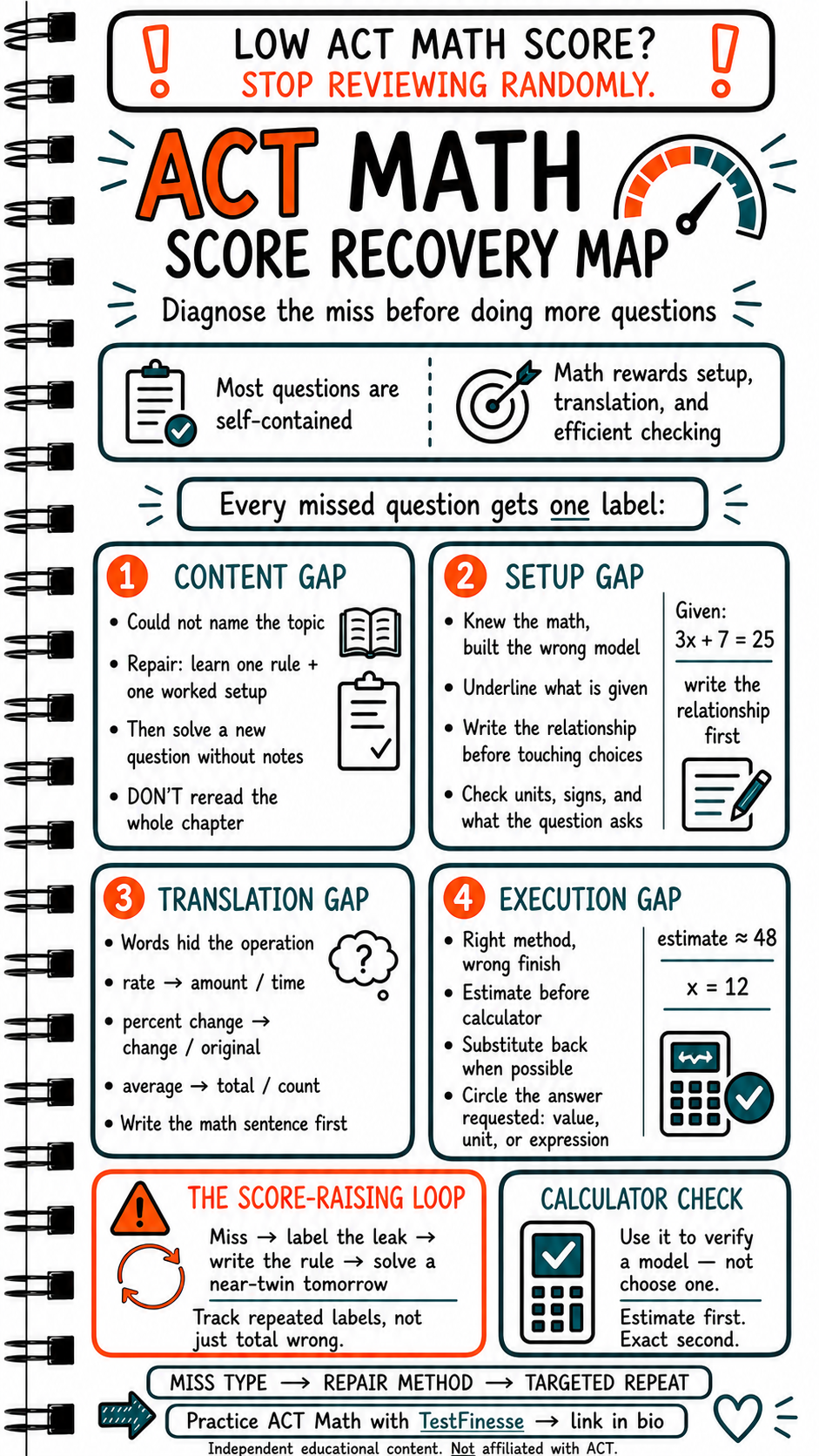
A low ACT Math score does not always mean you need to complete hundreds more practice questions.
Sometimes the problem is not effort. It is diagnosis.
If every missed question gets the same label—“I got it wrong”—your review process cannot tell you what to fix. You may spend hours rereading chapters when the real issue is translating word problems, choosing the wrong setup, or making a preventable execution mistake.
The better system is simple:
Miss the question. Label the leak. Repair the exact skill. Solve a near-twin problem.
The current ACT Math section has 45 questions and 50 minutes. ACT describes most Math questions as self-contained, although some questions may be connected to a shared graph or chart. A calculator is allowed on the Math section, but ACT emphasizes that every problem can be solved without one. That makes setup, estimation, and checking especially valuable.
Give Every Miss One Label
Every missed question should receive one primary label:
Content gap
Setup gap
Translation gap
Execution gap
The purpose is not to create a complicated error log. The purpose is to identify the repair method.
If one category appears repeatedly, that category becomes your next study priority.
1. Content Gap: You Could Not Name the Topic
A content gap occurs when you do not recognize the mathematical idea being tested or cannot recall the rule needed to begin.
Examples include:
Not recognizing a quadratic relationship.
Forgetting how slope or rate works.
Confusing probability with percent.
Not knowing the relevant geometry relationship.
Forgetting what a function notation expression means.
The repair should be narrow.
Do not automatically reread an entire chapter. Instead:
Learn one rule.
Review one worked setup.
Solve a new question without looking at your notes.
Explain why the rule applies.
For example, if you miss a percent-change question, the repair may be:
\[ \text{Percent change} = \frac{\text{new} - \text{original}}{\text{original}} \times 100 \]
The important part is not only memorizing the formula. It is knowing that the original amount is the denominator.
A content repair should end with retrieval, not rereading.
2. Setup Gap: You Knew the Math but Built the Wrong Model
A setup gap occurs when you understand the underlying mathematics but translate the given information into the wrong relationship.
You may:
Use the wrong quantity as the starting value.
Add when the problem requires a ratio.
Use the wrong variable.
Choose an equation that does not represent the wording.
Ignore what the question actually asks you to find.
Before touching the answer choices, underline:
What is given.
What is unknown.
What relationship connects them.
What unit the final answer should have.
Suppose the problem gives:
\[ 3x + 7 = 25 \]
Do not rush directly into calculator mode. First identify the relationship and the requested quantity. Then solve:
\[ 3x = 18 \]\[ x = 6 \]
The arithmetic is simple. The point is that the model must match the question before the calculation begins.
Write the relationship before touching the choices.
3. Translation Gap: The Words Hid the Operation
A translation gap occurs when you understand the numbers but misread the language.
Common translation clues include:
Rate: amount divided by time.
Average: total divided by number of items.
Percent change: change divided by original.
Per: usually signals a rate or division relationship.
Of: often indicates multiplication.
At least: greater than or equal to.
At most: less than or equal to.
Difference: subtraction, usually with attention to order.
Remaining: original amount minus what was used or removed.
The repair is to write a mathematical sentence before calculating.
For example:
“A car travels 180 miles in 3 hours” becomes \(180 \div 3\).
“A 20% increase from 50” means \(50 + 0.20(50)\).
“The average of five values is 12” means total \(= 5 \times 12\).
This step prevents the familiar-number trap, where students see numbers they know how to manipulate but never translate the actual task.
Do not calculate until the words have become a relationship.
4. Execution Gap: The Method Was Right but the Finish Was Wrong
An execution gap occurs when your method is correct but the final answer fails because of arithmetic, signs, units, rounding, or an incomplete check.
Common examples:
Entering a calculator expression incorrectly.
Choosing the wrong positive or negative result.
Rounding too early.
Forgetting to substitute an answer back into the equation.
Reporting a radius when the question asks for diameter.
Solving for an intermediate value instead of the requested quantity.
Use three checks:
Estimate First
Before calculating exactly, predict the approximate size of the answer.
If you estimate 48 and your calculator returns 480, stop and inspect the setup.
Substitute Back
When possible, put your answer back into the original relationship. This is especially useful for equations, proportions, and rates.
Circle the Requested Quantity
At the end, identify whether the problem asks for:
A value.
A unit.
An expression.
A percentage.
A number of items.
A length, area, or volume.
A correct method can still produce a wrong answer if the finish is not checked.
Use the Calculator as a Check
The calculator is a tool for verifying arithmetic and testing a model. It is not a substitute for choosing the model.
A productive calculator workflow is:
Translate the wording.
Write the relationship.
Estimate the result.
Enter the calculation.
Check whether the result fits the estimate and answer choices.
ACT permits calculators on the Math section, but calculator use is subject to the official policy. Digital ACT testers may have access to an on-screen calculator, while handheld calculators must meet ACT requirements.
Use the device you plan to use on test day during practice so that calculator entry becomes automatic rather than another source of timing loss.
The Score-Raising Loop
After every meaningful miss, follow this loop:
Miss: Identify the question you got wrong.
Label: Choose content, setup, translation, or execution.
Write the rule: State what should happen next time.
Solve a near-twin: Complete a fresh question testing the same skill.
Track the trend: Look for repeated labels, not only total wrong answers.
Example:
Miss type: Translation.
Trigger: “Per” was interpreted as multiplication.
Fix rule: Write the rate as amount divided by time.
Near-twin: Solve a new distance-rate-time question.
Follow-up: Retest the skill later without notes.
This approach converts practice into targeted training.
Use The TestFinesse Practice Loop
The TestFinesse method fits naturally here:
Answer the question independently.
Explain your setup and reasoning.
Reveal the official solution.
Fix the gap with one rule and one near-twin question.
The purpose of review is not to collect explanations. It is to change your next decision.
Final Takeaway
More questions do not automatically create a higher score. Better diagnosis does.
Miss type → repair method → targeted repeat.
When your ACT Math score is stuck, stop reviewing randomly. Find out whether the leak is content, setup, translation, or execution, then train that exact weakness.
Independent educational content. Not affiliated with ACT.
Accuracy sources checked: ACT Mathematics Test Description, ACT Exam Sections, Structure & Timing, ACT Calculator Policy
Keep studying
Practice Exam Skills
Turn this into a better score
Reading about a skill only gets you so far. TestFinesse's AI coach walks you through exam questions, explains exactly where your reasoning breaks down, and adapts to what you actually need to practice next.
Explore All Exams